v2.0 — Dual Engine · Private / Invite-only · Source protected
Fade Engine + Normal Engine.
Two independent systems.
One TradingView Scalping Indicator.
No repaint · Source protected · Invite-only access
v2.0 introduces a Dual Engine architecture: the Fade Engine — a counter-trend mean-reversion system with Candle Gate filtering and verified live win rates up to up to 86.7% — plus the original Normal Engine for classic BUY/SELL trend-following. Two engines. Completely independent. One decision at a time.
- ⚡Fade Engine (core): detects over-extended candles far from VWAP with extreme RSI — expects snap-back
- 🔒Candle Gate: structural filter — invalidates spikes live, tick by tick. What you see is always valid.
- 📊Honest rolling stats: last 50 signals, realistic entry buffer, W/L label on every historical signal
- ✅Normal Engine: trend-following BUY/SELL for extended directional moves — Confidence scoring, Pivot Entry & Invalidation Zone
Fade Engine · 5m · verified live on chart · rolling last 50 signals
Engine Evolution
Continuous improvements to your execution workflow.
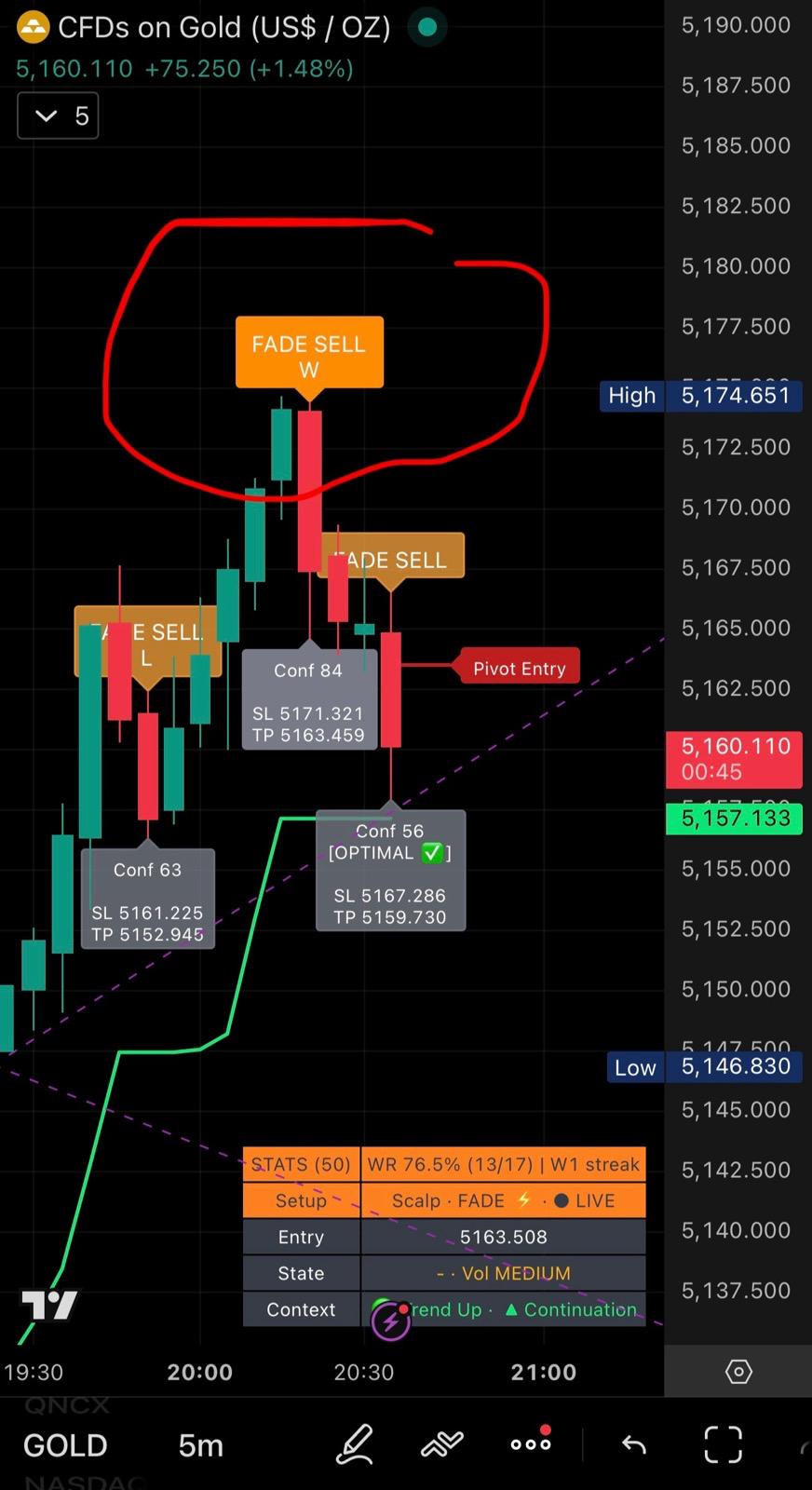
Trend TP/SL Configurable · Settings Panel Overhaul · Early Signal Removed
The v2.0.3 update brings verified Trend Engine TP/SL defaults, a fully reorganized settings panel, and a cleaner signal set. Early BUY/SELL removed — only Confirmed signals remain. Input count reduced from 119 to 97.
- Trend TP/SL configurable: SL and TP1 now user inputs — default 1.5/1.5 ATR, verified across Gold, Nasdaq, ETH, Apple, CADUSD. TP2/TP3 scale automatically (×1.6, ×2.4).
- Early signal removed: Orange early BUY/SELL label hardcoded off — interface cleaner, focus on Confirmed signals only.
- Settings panel reorganized: Groups renamed with emoji, logical order — Fade Engine → Trend Engine → Global Filters. Easier to navigate.
- New ⚙️ GLOBAL — Filters group: Anti-Spam and Session filter unified — apply to both engines in one place.
- Input reduction: 119 → 97 inputs. Redundant controls hardcoded, interface significantly cleaner.
Fade Engine — Live on Chart
Real setups. Real markets. W/L labels on every signal — verifiable by anyone.
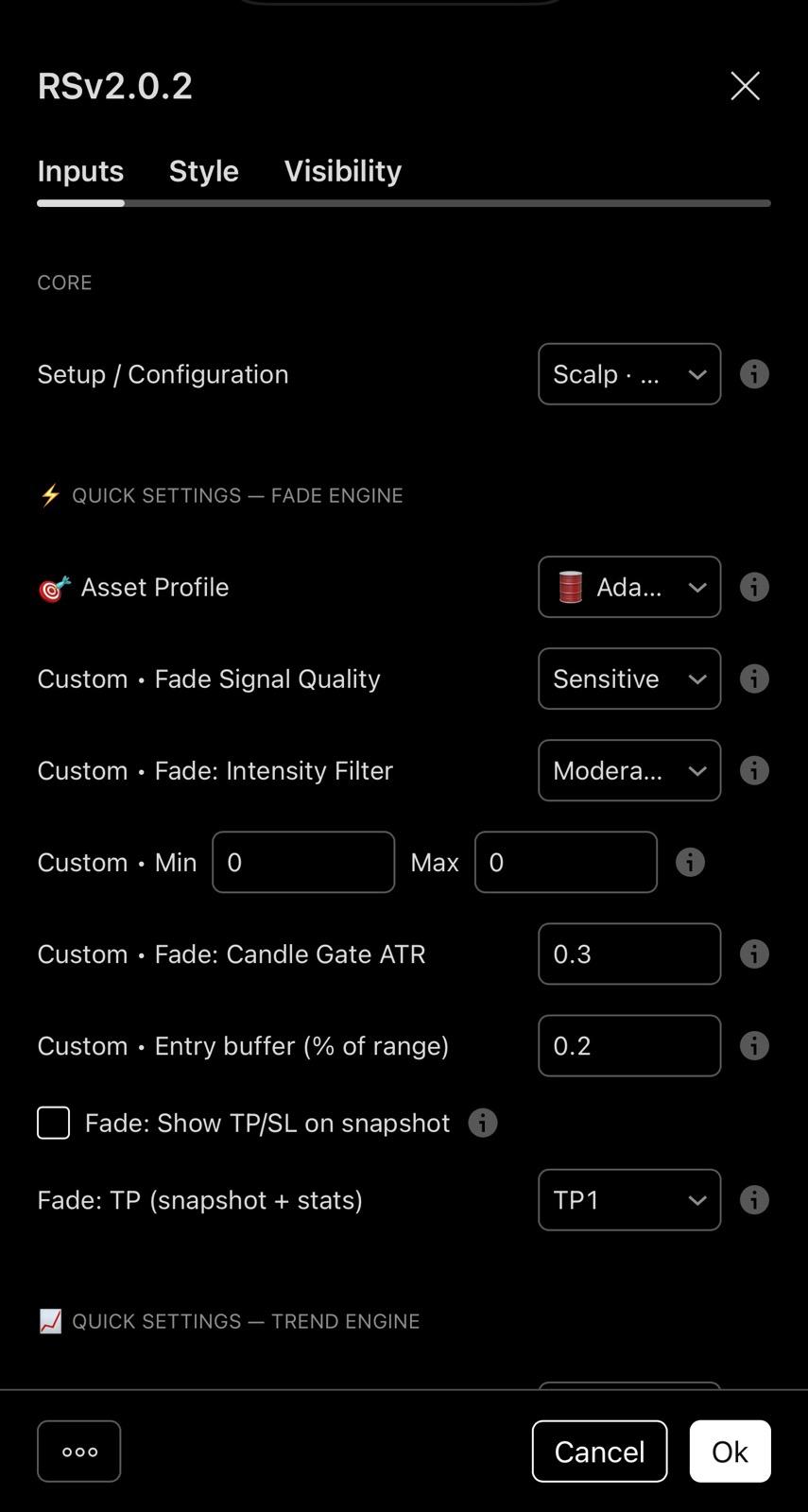
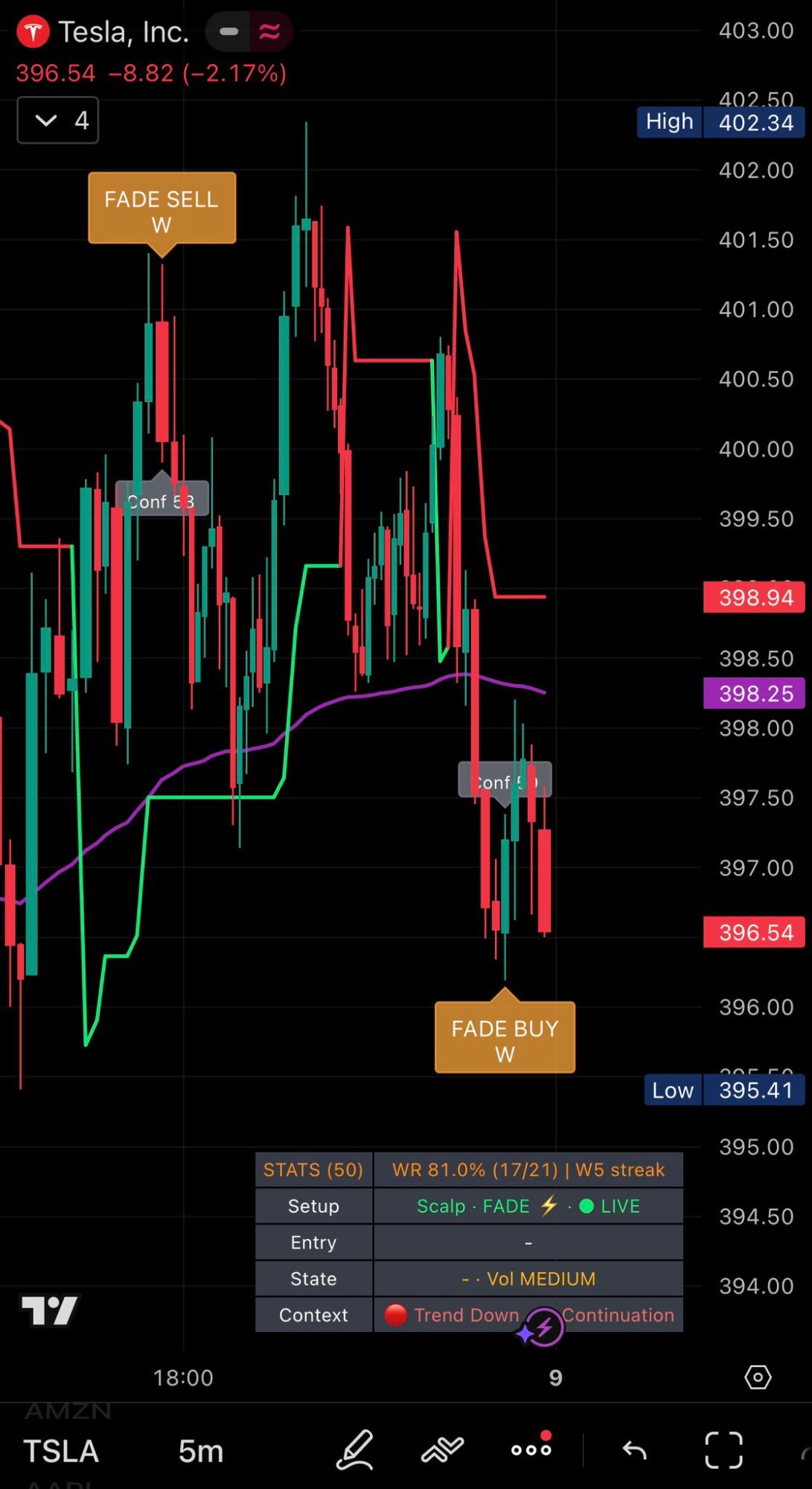
Win rates shown are rolling last-50 signals at time of capture. Results vary by asset, session and market conditions. Educational use only.
Learn How It Works
Clear explanations of Dual Engine logic, Fade Engine mechanics, Candle Gate filtering and execution flow. Educational content — not financial advice.
Best TradingView Indicator
How to choose a high-quality indicator, avoid repaint traps and trade with context and confidence.
How to Use TradingView Indicators
Learn how to use indicators correctly, avoid common mistakes and trade with context and probability.
Early Signal Explained
How Early warnings work, why they appear and disappear, and how they prepare the trader before confirmation.
No Repaint Logic
Why confirmed signals remain fixed and how Candle Gate eliminates spikes before they become false entries.
TradingView Buy & Sell Signals
How trading signals work, why most fail, and how context and confidence improve execution.
Confidence Score
How probability ranking (Normal Engine) filters weak setups and improves execution decisions.
Best Scalping Indicator
What makes a high-quality scalping indicator and how to execute fast trades with confidence and market context.
VWAP + SuperTrend Engine
Core calculation logic behind trend direction, signal validation and Fade snap-back detection.
Market Context Trading
Understand trend vs range markets and how context improves signal probability and execution.
Invite-Only Access
How activation works and why the source code is protected.
Support & Resistance Zones
How dynamic SR zones are detected and why they matter for Fade and Normal Engine execution.
Forex Trading Indicator
What makes a professional FX indicator: market context, no repaint, confidence scoring and risk structure.
Crypto Trading Indicator
What to look for in crypto indicators: no repaint, context filters, confidence scoring and clean execution.
Trend vs Range Trading
Understand market regime and why the Fade Engine performs best in mean-reverting, range-bound conditions.
How to Read Support & Resistance
Understand market reaction zones and improve trade execution with dynamic SR levels.
TradingView Indicator Guide
Complete guide to Dual Engine signals, Candle Gate logic, confidence scoring and execution workflow.
Trading Discipline Guide
Learn how discipline improves consistency, reduces emotional trading and increases execution quality.
Trading Risk Management
Learn position sizing, stop loss discipline and probability-based trading execution.
📖 How It Works — Full Guide + User Manual
Dual Engine logic explained. Decision-support philosophy. Execution workflow. All settings documented. Recommended assets.
Dual Engine — Core Features
Two independent systems. Each with its own logic, filters and visual output.
- Counter-trend · mean-reversion
- Over-extended candles far from VWAP + extreme RSI
- Snap-back target: VWAP reversion
- Candle Gate — close[1] ± ATR structural filter
- 20% entry buffer from candle extreme
- "Already Reversing" warning at 65% recovery
- Adaptive invalidation timer per timeframe
- W/L label on every historical signal
- Rolling last 50 · honest stats · first touch wins
- Live panel: State · Context · Entry · Setup
- Classic BUY/SELL trend-following
- SuperTrend + VWAP + RSI + SR Zones
- Confidence scoring 0–100
- Pivot Entry + Invalidation Zone
- No-Trade protection (ATR volatility filter)
- Market Context (HTF EMA directional filter)
- Early Signal (LIVE heads-up before confirmation)
- Live Panel: State · Context · Entry · Setup
- Execution-first UI — clean on mobile & desktop
⚡ Candle Gate
Structural filter on close[1] ± ATR. Invalidates spiked candles on both historical and live data. Tick-by-tick monitoring on live candles — the UI clears instantly if a spike occurs.
📊 Honest Rolling Stats
Win Rate calculated on the same entry used by the trader. First touch wins — TP hit before SL = WIN. Rolling last 50 signals. No cherry-picking, no theoretical entries.
🏷 W/L Label Overlay
Every historical Fade signal shows W or L directly on the chart. Audit the last 50 trades at any zoom level — no tooltips, no external spreadsheets needed.
🎯 Realistic Entry Buffer
Entry calculated at 20% of candle range from the extreme — not the wick tip. Every signal has a genuinely tradeable entry on the next candle open.
📱 Execution-First UI
Live panel always visible: State · Context · Entry · Setup. Clean on mobile and desktop. Snapshot boxes for rapid decision-making.
🔐 Source Protected
Invite-only on TradingView. Users run the script — nobody can view or copy the source code. Access is tied to your TradingView username.
License
Rany Sniper Signals is licensed for personal use via TradingView. Any redistribution, sharing, resale or modification (even partial) is strictly prohibited. Access may be revoked at any time in case of violation.
Risk Disclaimer
Trading involves substantial risk and may not be suitable for everyone. This indicator is for educational/informational purposes only and is not financial advice. Past performance is not indicative of future results. You are responsible for your own decisions.
Choose Your Access Plan
Monthly Access
- Full Dual Engine Access (Fade + Normal)
- Candle Gate + W/L Labels + Rolling Stats
- Source protected · invite-only
- Updates included
- Support via Telegram / Email
Taxes/VAT: may be added at checkout based on your country.
Manual onboarding: you're added after confirmation.
Yearly Access
Save $158 (≈ $65/month)
- Everything in Monthly
- Priority activation
- Best for consistent traders
Taxes/VAT: may be added at checkout based on your country.
Manual onboarding: you're added after confirmation.
Important: Access is tied to a TradingView account. You must be logged in to use the script.
Try it free for 7 days
Not sure if the win rates are real? Get invite-only access for 7 days, apply the Fade Engine on your charts, check the W/L labels yourself — then decide. No pressure. Educational use only.
7-Day Free Trial (Invite-Only)
- Full Dual Engine access — Fade + Normal (source protected)
- Verify Candle Gate and W/L labels directly on your charts
- Real-market test on your favorite assets (GOLD, SPX500, ETH, DAX…)
- No risk — cancel anytime before the 7 days end
your_tv_name)
Educational content only. Not financial advice. Trading involves risk.
Frequently Asked Questions
What is the Fade Engine and how is it different from the Normal Engine?
The Fade Engine is a counter-trend mean-reversion system. It detects over-extended candles far from VWAP with extreme RSI and expects a snap-back toward VWAP — designed for short, fast moves. It operates completely independently from the Normal Engine, which is a classic trend-following BUY/SELL system built for extended directional moves, with wider TP/SL levels and Confidence scoring. The two engines never interfere with each other.
What is Candle Gate?
Candle Gate is a structural filter that validates every signal against the previous candle's close ± ATR margin. If price spikes beyond that threshold — either historically or on a live tick — the signal is permanently invalidated and all visual elements (label, Pivot Entry, panel flash) clear immediately. What you see on the chart is always valid.
Are the win rates real and verifiable?
Yes. Every historical Fade signal shows a W or L label directly on the chart. Rolling stats (last 50 signals) are calculated using the same realistic entry buffer the trader would use — not the wick tip. Anyone with access can verify the numbers independently, directly on TradingView.
Which assets work best with the Fade Engine?
The Fade Engine performs best on mean-reverting, liquid markets: GOLD, SILVER, SPX500, DAX, NASDAQ, USDCAD, EURUSD, ETH. Avoid volatile altcoins and illiquid assets where price does not reliably revert to VWAP.
Does Rany Sniper Signals repaint or use future data?
No. Confirmed signals remain fixed once the candle closes. Candle Gate monitors every tick live — if a spike occurs, the signal clears immediately. No repaint, no future data used.
Recommended timeframes?
The Fade Engine default preset is 5m scalping. The Normal Engine covers wider ranges: Scalp 1m–15m (best 3m–5m–15m), Swing 1H–1D (best 4H–1D).
Is Rany Sniper Signals suitable for beginners?
Yes — because it reduces interpretation. W/L labels and rolling stats make performance transparent. You still need basic risk management, but the visuals are built to be clear on mobile and actionable in real time.
Is the source code protected?
Yes. The indicator is invite-only on TradingView. Users can run the script but cannot view or copy the source code.
Do I need a paid TradingView account?
No, it works on the Free plan. A paid plan is only required if you want a higher number of simultaneous alerts (plan limits may apply).
Can I cancel anytime?
Yes, you can manage or cancel your subscription from your Whop dashboard at any time.
Does it guarantee profits?
No. It's a tool to support decision-making, not a guarantee. Always use risk management.
How do alerts work with different TradingView plans?
Alerts are delivered by TradingView servers. Notifications can be sent to mobile, desktop or web. The number and duration of simultaneous alerts depend on your TradingView plan.
Activation & Support
Get in Touch
Telegram: @ranysnipersignals
Email: [email protected]