How It Works — User Manual
Rany Sniper Signals v2.0 is a decision-support tool. It does not place trades or guarantee outcomes. It provides structured, objective signal information — the trader reads it, evaluates it, and decides. This manual covers the Dual Engine architecture, the live panel, all settings, and the recommended execution workflow.
Contents
1. What "Decision Support" Means
The indicator surfaces what market structure shows — over-extension, trend alignment, SR proximity, volume context. It does not tell you how much to risk, when to close, or whether a specific trade will win.
- It shows when conditions qualify for a Fade or Normal signal
- It shows when conditions do NOT qualify — panel goes silent, Candle Gate clears, No-Trade zone activates
- It shows historical W/L results honestly — verify the win rate yourself before trusting it
- It does not execute trades, move stops, or guarantee any outcome
2. Dual Engine Overview
v2.0 runs two completely independent engines with different logic, different conditions, and different market regimes.
- Fires on over-extended candles far from VWAP with extreme RSI
- 5 filters: SR Zone · VWAP distance · RSI · SuperTrend · Volume
- Candle Gate: structural tick-by-tick validation
- 20% entry buffer from candle extreme
- W/L label on every historical signal
- Live panel: State · Context · Entry · Setup
Best regime: ranging / mean-reverting · Best TF: 5m
- SuperTrend + VWAP + RSI + SR Zones + HTF confirmation
- Confidence Score 0–100 on every signal
- Early (LIVE) warning during candle formation
- Confirmed signal fixed at candle close — no-repaint
- Pivot Entry + Invalidation Zone shown visually
- No-Trade Zone in choppy/low-volatility conditions
Best regime: trending market · Extended directional moves · Best TF: 5m–1H
- ✅ Price oscillating around VWAP · RSI swinging between extremes → Fade Engine
- ✅ Price trending · SuperTrend stable · VWAP on one side → Normal Engine
- ❌ Choppy mid-range · no clear structure → Neither fires. Stay out.
3. Reading the Live Panel
The Fade Engine live panel updates on every tick. It is the primary real-time interface between the engine and the trader.
| Row | What it means |
|---|---|
| STATS (50) | Rolling win rate over the last 50 Fade signals. Format: WR% (wins/total) | current streak. Calculated using the realistic entry buffer — not theoretical prices. |
| Setup | Active configuration: preset name · Engine · candle state (LIVE = candle open) · any active modifiers. NT PENALTY = a No-Trade condition is partially active — signal is weaker. |
| Entry | The exact buffer price for entry — 20% of candle range from the extreme. Use this for your limit order, not the wick tip. Shows "–" if no valid setup is forming. |
| State |
Current Fade Engine state: READY = all 5 filters passed · enter at buffer price Vol LOW = volume filter not satisfied · signal weaker INVALIDATED = Candle Gate cleared the signal · do not enter Already Reversing = candle recovered 65%+ of its range · entry window closed · wait for next setup |
| Context | Macro context at signal time. VWAP bias (Trend Up / Trend Down / Neutral) + structure type (Continuation / Reversal / Compression). Assesses whether the Fade direction has macro support. |
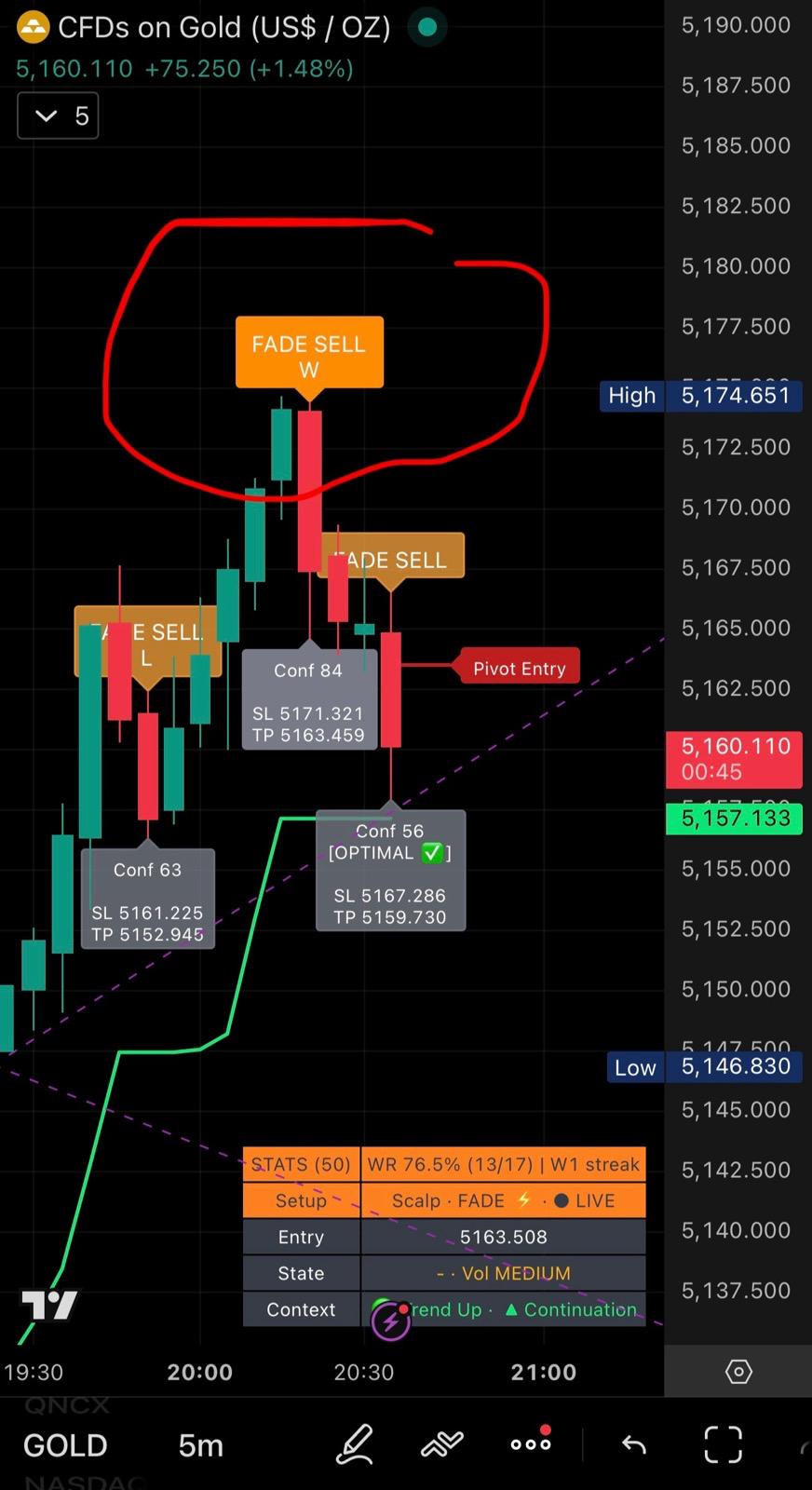 GOLD · 5m · Live Panel active
Live panel visible bottom-right — Stats (50) · WR 76.5% · Setup: Scalp · FADE · LIVE · Entry at buffer price · Context: Trend Up · Continuation
4. Fade Engine Signals — W/L Labels
- FADE SELL: Candle spiked up — over-extended above VWAP. Thesis: snap-back down toward VWAP.
- FADE BUY: Candle spiked down — over-extended below VWAP. Thesis: snap-back up toward VWAP.
- W label: TP touched before SL. First touch wins.
- L label: SL touched before TP.
- Entry: 20% of candle range from extreme — shown in panel at signal time.
- SL: Beyond the candle extreme (wick tip + ATR buffer).
- TP: VWAP level at signal time (TP1), or ATR-based target (TP2).
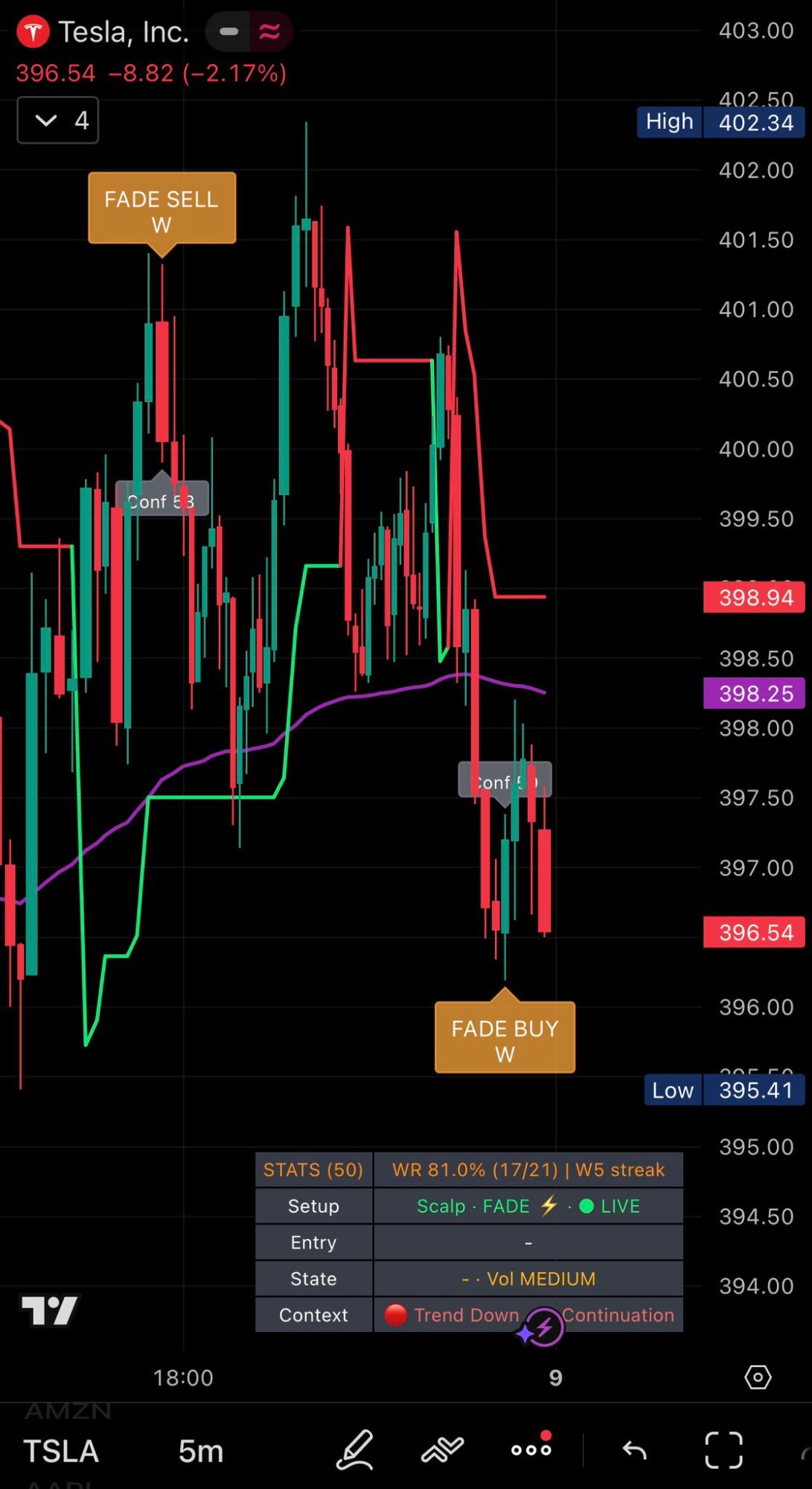 TESLA · 5m · W/L labels on chart
Both sides faded — Fade Sell W at range top, Fade Buy W at range bottom. WR 81.0% (17/21) · W5 streak · Stats visible in live panel.
5. Normal Engine Signals — Confidence Score
The Normal Engine prints BUY/SELL labels with a Confidence Score (0–100). Focus on signals above 70. Unlike the Fade Engine — which targets short snap-back moves toward VWAP — the Normal Engine is designed for extended directional moves: it rides trend momentum with wider TP/SL levels to give the trade room to develop.
- Conf 70+: High confidence — full-size execution.
- Conf 50–69: Medium — reduce position size or skip.
- Conf below 50: Low — skip. Wait for a better setup.
- Early (LIVE): Appears during candle formation — preparation only, not an entry trigger. May disappear if conditions weaken before candle close.
- Confirmed BUY/SELL: Fixed at candle close — no-repaint. Permanent on chart.
- Pivot Entry: Visual reference for entry price.
- Invalidation Zone: Where the trend thesis breaks — use as SL reference.
6. Quick Settings — Fade Engine
Settings → ⚡ QUICK SETTINGS — FADE ENGINE. Primary controls for most traders.
| Setting | Default | What it does |
|---|---|---|
| Setup / Configuration | Scalp · … | Master preset. Scalp · FADE · LIVE candle recommended for 5m. Selecting a preset auto-configures the parameters below. |
| Asset Profile | CUSTOM | Pre-optimised bundles for asset types (GOLD, FX, INDEX, CRYPTO). CUSTOM = manual control. Start with a preset, switch to CUSTOM to fine-tune. |
| Fade Signal Quality | Sensitive | Filter strictness. Sensitive = more signals. Strict = fewer, higher-quality signals. Start with Sensitive on liquid 5m assets. |
| Fade: Intensity Filter | Broad | How far a candle must be from VWAP to qualify. Broad = catches more extensions. Strong = only the most extreme over-extensions. Use Broad on 5m. |
| Candle Gate ATR margin | 0.6 | Structural filter threshold: signal candle must fall within close[1] ± (ATR × this value). Higher = more permissive. Lower = stricter, fewer but higher-quality signals. Range: 0.3–0.7. |
| Entry buffer (% of range) | 0.3 | Entry price = candle extreme − (candle range × this value). 0.3 = 30% from the wick tip. This same value is used in W/L stats — what you set here is what the stats reflect. |
| Fade: Show TP/SL on snapshot | off | Draws TP and SL lines on chart at signal confirmation. Visual reference only. |
| Fade: TP (snapshot + stats) | TP1 | TP level used for W/L calculation. TP1 = VWAP (recommended — matches snap-back thesis). TP2 = ATR-based secondary target. |
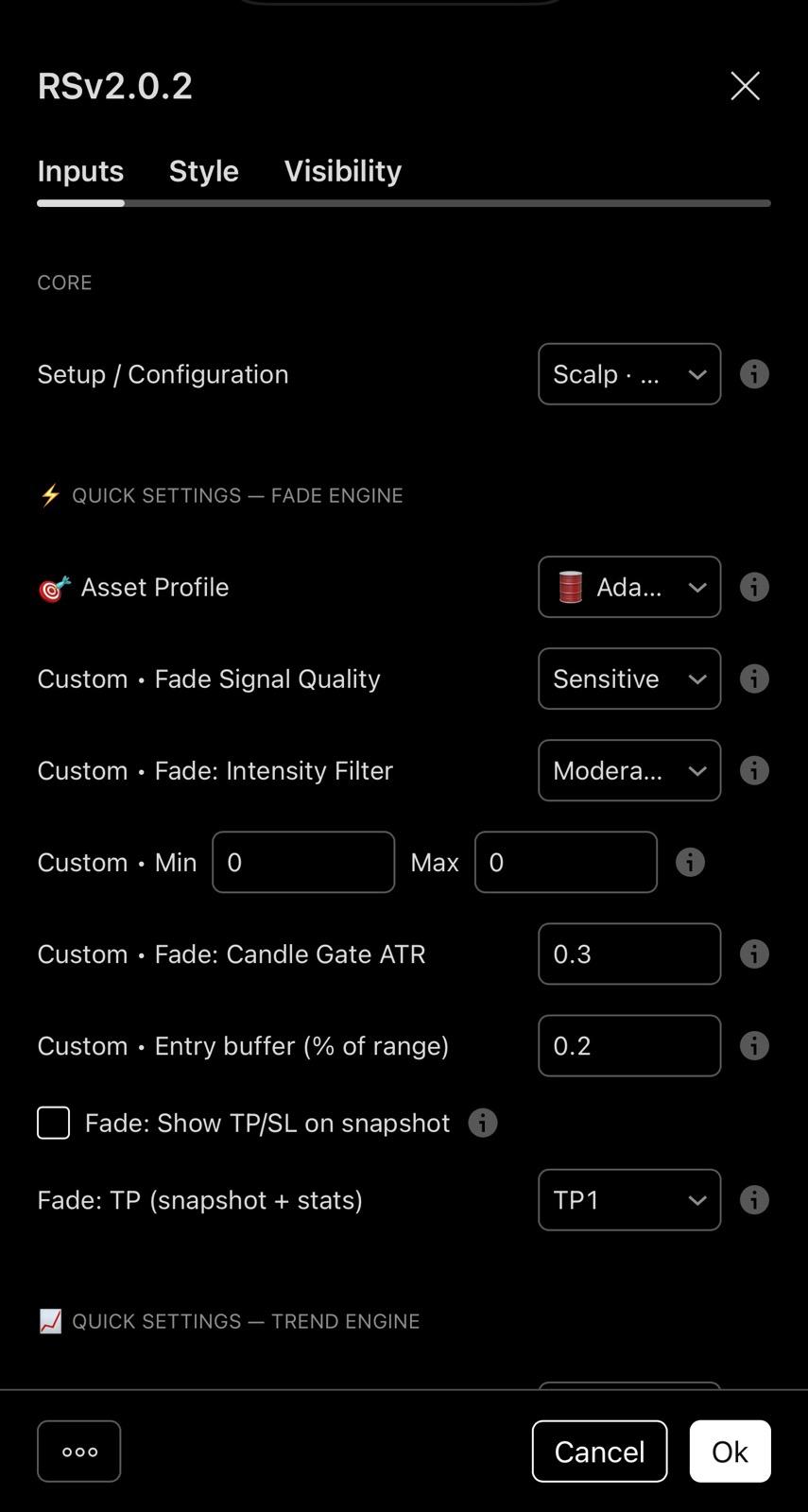 RSv2.0.2 · ⚡ Fade Engine Settings
Quick Settings panel — Asset Profile set to Adaptive · Signal Quality: Sensitive · Candle Gate ATR: 0.3 · Entry buffer: 0.2 · Custom setups saveable per asset.
7. Quick Settings — Normal Engine
Settings → 📈 QUICK SETTINGS — TREND ENGINE.
| Setting | Default | What it does |
|---|---|---|
| Signal Quality | High | Pre-set filter strictness. High = fewer but stronger signals. Most traders should use High. |
| Min Confidence | 70 | Signals below this Confidence Score are hidden. 70 for execution, 60 for observation only. |
| Early: Min Potential | 60 | Minimum score for an Early warning to display. Prevents weak forming setups from cluttering the chart. |
| Use Volume filter | on | Requires volume confirmation on Normal Engine signals. Keep on for quality filtering. |
| Higher Timeframe Confirmation | on | Requires HTF trend to agree with signal direction. Strong macro alignment filter — recommended always-on. |
| Use Market Context Filter (Daily) | on | Uses Daily EMA context to gate signals. Prevents counter-trend signals on the wrong side of Daily structure. |
| Market Context Mode | Gate (must…) | Gate = signals only fire when Daily context aligns (strict). Soft = context shown but does not block signals. |
| Use Session Filter (Scalp) | off | Restricts signals to defined trading hours. Enable if you only trade a specific session (e.g. 0930–1600 NY). |
| Use No-Trade Zone | on | Suppresses signals when ATR drops below minimum threshold — protects against choppy low-volatility markets. Keep on. |
8. Advanced Settings Reference
These are in the deeper sections of the Inputs panel. Leave at defaults until you understand the core behaviour.
⚡ FADE ENGINE — SETTINGS
| Setting | Default | What it does |
|---|---|---|
| Fade body threshold (ratio) | 1 | Minimum candle body-to-range ratio. Higher = only large-body candles qualify as Fade setups. |
| Fade VWAP distance (ATR) | 0.9 | Minimum VWAP distance in ATR units. Increase to require more extreme extensions before a signal fires. |
| Fade RSI extreme threshold | 60 | RSI must exceed this value (above for SELL, below for BUY). Increase to 70+ for a stronger RSI filter. |
| Fade SL multiplier (ATR) | 0.5 | SL distance = ATR × this value. Increase if getting stopped by normal volatility noise. |
| Fade TP multiplier (ATR) | 0.5 | TP2 distance = ATR × this value. TP1 (VWAP) is calculated independently. |
| Fade: History depth (bars) | 500 | How many bars back the W/L stats are calculated. 500 is sufficient for rolling-50 stats on most assets. |
| Fade: Show W/L on labels | on | Displays W or L on every historical Fade signal. Keep on — this is how you verify the rolling win rate. |
| Fade: Skip extreme extensions (Conf ≥ 90) | on | Skips setups where Confidence ≥ 90 — very extreme extensions may indicate runaway momentum rather than a snap-back setup. |
| Fade: skip if volume accelerating | off | Skips signals where volume is rising aggressively — suggests the move has momentum rather than being a fakeout. Experimental. |
| Fade: require declining volume | off | Requires volume to be declining on the signal candle (exhaustion signal). More selective — fewer setups but stronger exhaustion confirmation. |
📈 TREND ENGINE — SNIPER
| Setting | Default | What it does |
|---|---|---|
| SNIPER: trend-only (must match SuperTrend) | on | Signals only fire when aligned with SuperTrend direction. Prevents counter-trend entries in strong moves. Keep on. |
| SNIPER: avoid signals too close to VWAP | on | Suppresses signals when price is in the VWAP indecision zone. Prevents entries in the highest-risk area. |
| Near VWAP max (ATR) | 0.12 | VWAP exclusion distance in ATR. Increase for a wider exclusion zone around VWAP. |
| One signal per candle | on | Prevents duplicate Normal Engine signals on the same candle. Keep on. |
Visual Settings
| Setting | Default | What it does |
|---|---|---|
| Show VWAP | on | VWAP line on chart. Keep on — it is the snap-back target for Fade Engine and bias reference for Normal Engine. |
| Show SuperTrend line | on | SuperTrend line visual. Reference for macro trend direction. |
| Show Pivot Entry (visual only) | on | Entry reference level on Normal Engine signals. Visual only. |
| Show Invalidation Zone (visual only) | on | SL reference zone on Normal Engine signals. Use as stop-loss guide. |
| Show SR Zones (Live candle only) | on | SR zones shown only on the live candle to keep chart clean. |
| Minimum HTF tests | 3 | How many times a level must be tested on HTF to qualify as a significant SR zone. Increase to 4–5 for stricter detection. |
9. Recommended Execution Workflow
Fade Engine — 5m
- Identify regime: Price oscillating around VWAP? RSI swinging between extremes? → Fade Engine is appropriate.
- Load preset: Settings → Setup / Configuration → Scalp · FADE · LIVE candle.
- Watch the panel: State must not show "Already Reversing" or "INVALIDATED". Vol LOW = weaker setup.
- Wait for Candle Gate: The label only appears when the gate passes. Do not anticipate.
- Enter at buffer price: Use the Entry value from the panel. Limit order — not market chase.
- Set SL and TP: SL beyond candle extreme + ATR buffer. TP at VWAP shown on chart.
- Respect the result: SL hit = setup was wrong. No revenge trades.
Normal Engine — 5m to 1H
- Identify regime: SuperTrend stable in one direction? Price trending away from VWAP? → Normal Engine.
- Set filters: Signal Quality → High. Min Confidence → 70. HTF Confirmation → on.
- Watch for Early warning: LIVE label = conditions forming. Do not enter — wait for confirmation.
- Wait for Confirmed signal: BUY/SELL prints at candle close. Check Confidence — skip if below 70.
- Enter near Pivot Entry: Use the visual Pivot Entry line. Do not chase far from it.
- SL at Invalidation Zone: The zone is drawn automatically. Use it as your stop reference.
- Respect the result: Invalidation Zone hit = trade done. Wait for next setup.
10. Recommended Assets & Verified Win Rates
GOLD · SPX500 · USDCAD · EURUSD · USDCHF · ETH · DAX · NASDAQ · SILVER · GBPUSD
Avoid: Low-cap altcoins · illiquid exotic pairs · assets with missing or erratic volume data.
| Asset | Win Rate (5m) | Notes |
|---|---|---|
| SPX500 | up to 86.7% | Strongest mean-reversion on 5m. Highly liquid. |
| USDCAD | up to 86.7% | Strong mean-reversion. Low spread during NY session. |
| ETH/USD | up to 84% | High liquidity crypto. Best during active sessions. |
| GOLD (XAUUSD) | up to 80%+ | Classic Fade Engine asset. VWAP snap-backs frequent. |
| SILVER (XAGUSD) | up to 77%+ | Strong but slightly more volatile than GOLD. |
| TESLA | up to 73.7% | Good intraday mean-reversion. Higher volatility. |
| DAX | up to 72.4% | European session focus. Strong during EU open. |
Rolling last 50 signals · 20% entry buffer · verifiable directly on TradingView. Past performance does not guarantee future results.
Educational content only. Not financial advice. Trading involves substantial risk of loss. Past performance is not indicative of future results.
Try it free for 7 days — no risk
Full access · 7-day free trial · Cancel anytime · Invite delivered via Telegram
Start Free Trial →Not financial advice. Results vary by asset and market conditions. All trading decisions remain the sole responsibility of the trader.